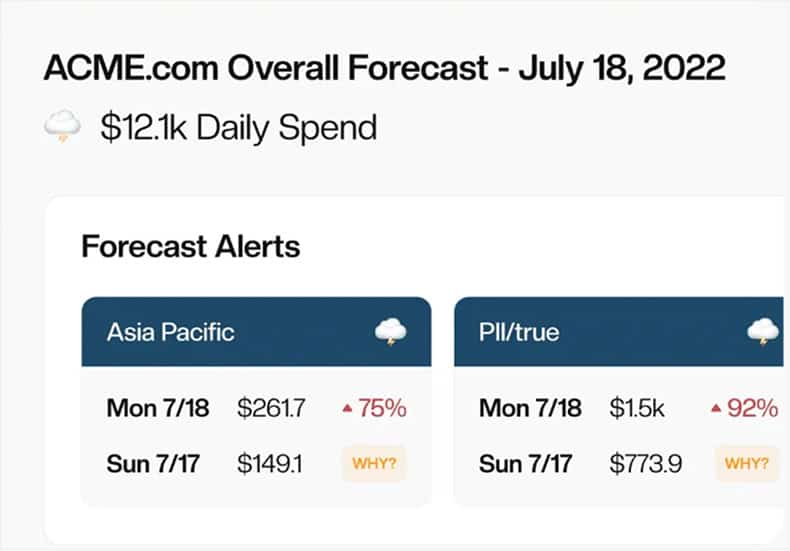
Effortless daily cost reports with CloudForecast’s AWS Microsoft Teams Integration.
CloudForecast sends you daily transparent reports via Microsoft Teams that help you understand your AWS bill, find any overspends, and promote opportunities to save costs.


Companies who have eliminated cloud cost surprises and saved $1M+ annually by empowering their engineering teams to own their costs.


Sign up for CloudForecast
You will need a CloudForecast account to use our Microsoft Teams integration. Signing up for CloudForecast is quick and easy. We offer a risk-free 30-day free trial for all new sign ups.
Start a Free Trial
Quick and Easy Setup in <1 Min
Select the “reports” you want to send the reports to in Microsoft Teams. From there, click connectors, search for “Incoming Webhooks,” and press configure.

Integrations
Other Integrations

ProsperOps
Track ProsperOps savings insights in CloudForecast for a unified view of AWS costs. Get key metrics in your daily reports via Email, Slack, or Teams—effortlessly.

Slack
Give your team more cost awareness by sending them AWS cost management reports right in Slack.
Get a Daily AWS Cost Report Your Team Will Actually Read
What changed and who owns it, in Slack, Teams or email. Read-only access. Every feature is free for 30 days with no credit card, and daily reports stay free after that.
Start Free Trial